

MS Removes the Windows 11 Drag Tray Following User Feedback
MS rarely engages in bold user experience experiments for Windows 11 due to the risk of backlash. However, the company introduced a feature called “Drag Tray”, which sounded promising on paper but proved to be a nuisance for users engaging in drag-and-drop actions. Following negative feedback, MS has decided to remove the feature and is exploring alternatives.
What Is Drag Tray?
If you're unfamiliar with the term "Drag Tray", it is a feature that activates when you drag a file on the desktop toward the top of the screen. It opens a sharing tray, allowing you to send the file via apps like WhatsApp, Outlook, or others.
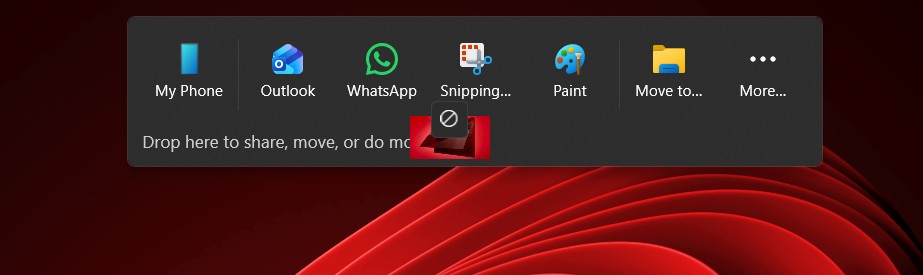
While the idea was to simplify the process of sharing files, the implementation fell short. The feature will now be removed in a future Windows update until MS devises a suitable replacement. But what exactly went wrong with Drag Tray?
Challenges with Drag Tray
The core issue lies in its interference with regular drag-and-drop operations. The floating tray often occupies a significant portion of the screen and appears almost instantly when users drag a file toward the top of the screen. This unintended activation frustrated many users.
Even after MS attempted to make the tray smaller and less intrusive, the changes did not resonate with users. The feature became particularly problematic for individuals with cluttered desktops or those who frequently reorganize their files. Dragging a file across the desktop or within a maximized File Explorer window could inadvertently trigger the tray, disrupting the process.

For example, users reported scenarios where they attempted to move files to specific folders, only to have the Drag Tray obstruct their actions. Despite its goal of enhancing productivity, the feature often had the opposite effect. While it may have been beneficial for touchscreen users—allowing them to easily share files by dragging them to the top of the screen—the feature failed to meet the expectations of power users who prioritize desktop organization.
MS’s Response
In a support document, MS confirmed that it has started removing Drag Tray in the latest Windows Insider builds. For general users, the removal will roll out in upcoming updates over the next few weeks or months.
The company hasn’t abandoned the idea of streamlining file sharing altogether. Instead, MS is considering a new solution to improve the file-sharing experience. In its updated release notes, MS stated:
“Thank you to Insiders who have provided feedback about the Drag Tray experience. Based on feedback, we’re removing the experience in this build. We’re continuing to explore improvements in this area and look forward to sharing more about a future replacement experience in a later update.”
How to Disable the Drag Tray Feature in Windows 11
For those who find Drag Tray particularly bothersome and do not want to wait for the official update to remove it, the feature can be manually disabled by following these steps:
- Open Settings.
- Navigate to System > Nearby sharing.
- Locate the toggle for Drag Tray and set it to “Off”.
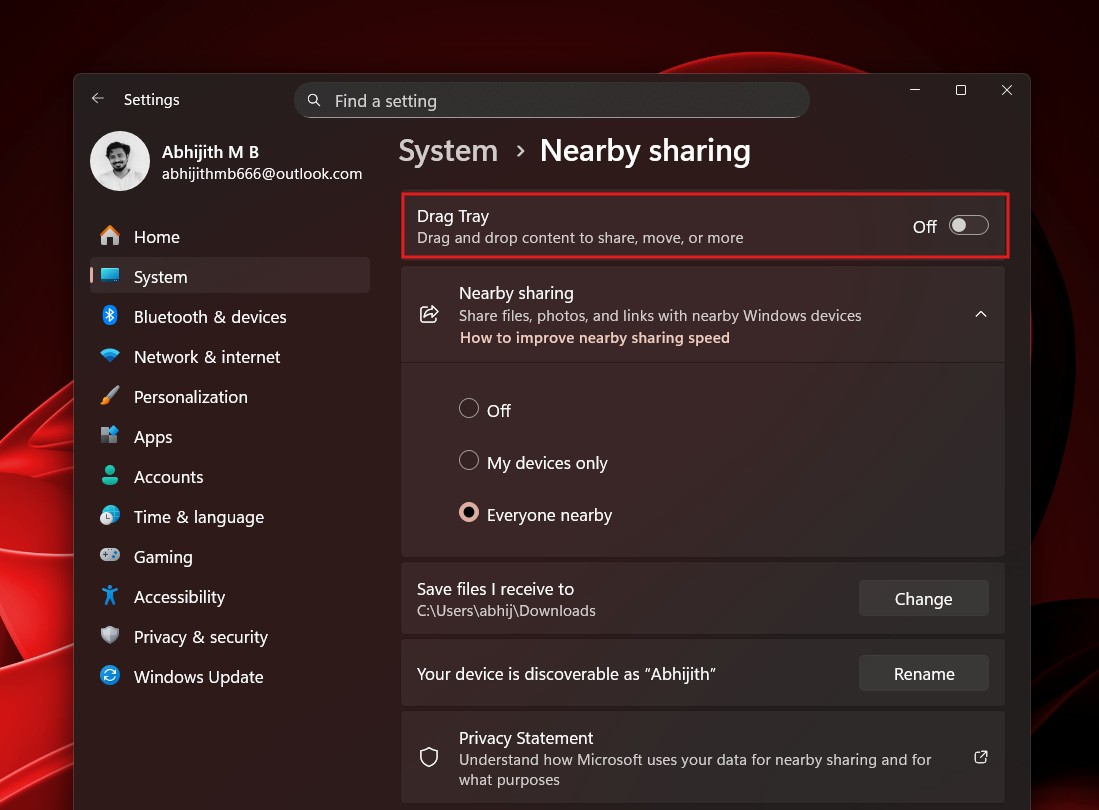
Once disabled, Windows will no longer display the Drag Tray when dragging files. Note that the feature is enabled by default and requires manual deactivation until it is completely removed in future updates.
Final Thoughts
While the Drag Tray concept had potential, its execution left much to be desired. It failed to balance ease of sharing with seamless file management, leading to frustration among users. MS’s decision to remove the feature reflects its commitment to user feedback and its willingness to adapt.
Do you think the Drag Tray had potential, or was it a misstep from the start? Let us know your thoughts in the comments below.
Windows Latest depends on readers like you. Make us your preferred source on Google Discover and Google Search, and help our independent reporting reach a wider audience.
